I Built an AI Job Copilot in 4 Days Using Paper, Windsurf, and OpenRouter
Originally published on Medium: https://medium.com/design-bootcamp/i-built-an-ai-job-copilot-in-4-days-using-paper-windsurf-and-openrouter-c019ea5b96fa?source=rss-6c5be1f9757d------2
How I went from idea to a deployed AI-powered Chrome Extension + web app while actively job hunting — without writing most of the code myself.
I’m a Product Manager / Design Engineer hybrid, currently in the middle of a job search. Like most people applying to dozens of roles, I was drowning in tabs — LinkedIn, Greenhouse, Lever, Ashby — copying company names into spreadsheets, manually tracking which roles I’d applied to, and constantly re-reading JDs to remember why I was interested.
So I built Trail — an AI-powered job copilot that:
- Detects when I’m looking at a job posting on LinkedIn
- Analyzes the JD against my resume using AI
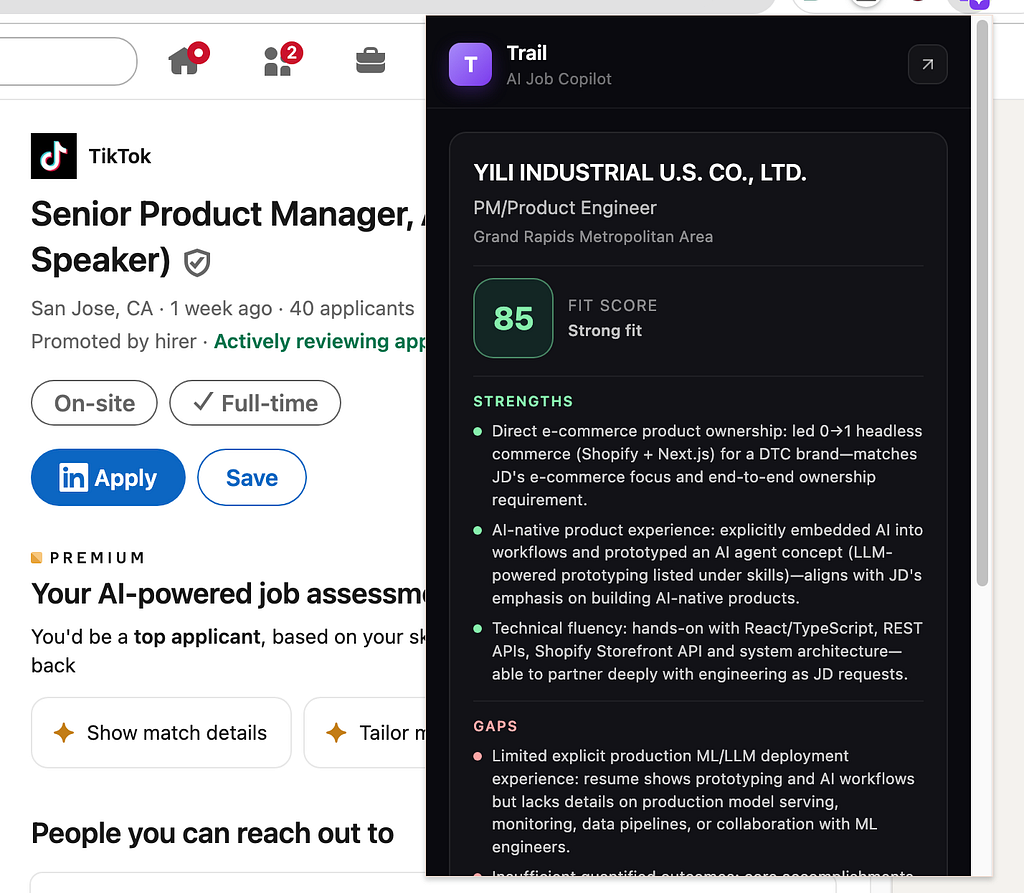
- Scores the fit (0–100) and surfaces strengths, gaps, and talking points
- Auto-saves everything to a Glassmorphism dashboard, which I actually enjoy opening
Here’s how I built it in 4 days, shipping a deployed web app, a Chrome Extension, and an AI analysis pipeline — using almost entirely AI-native tools.
The Stack
Before diving into the build, here’s what powers Trail:
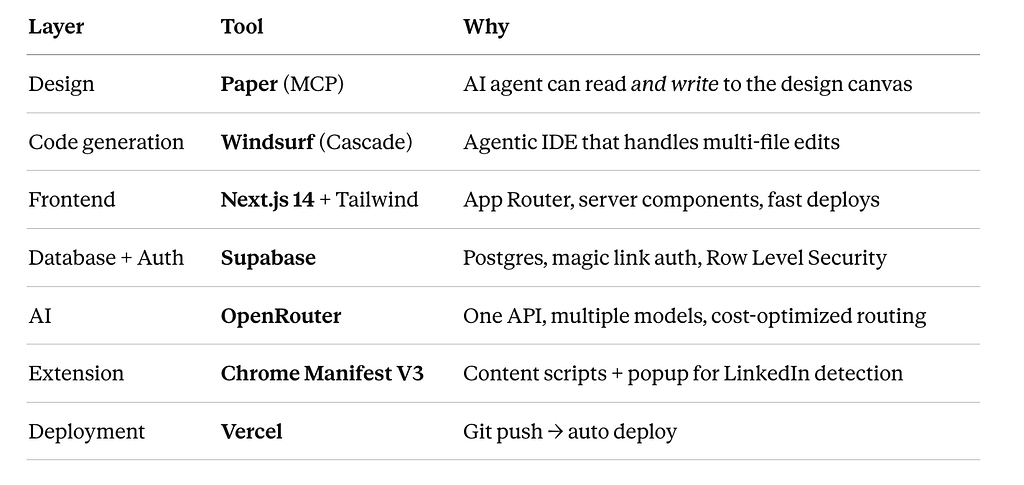
Trail structure
The interesting architectural choice: I route AI calls through OpenRouter instead of calling Anthropic directly. This lets me use cheap models (MiniMax M2.5 at $0.12/M tokens) for JD extraction and expensive models (Claude Sonnet for deep fit analysis) only when it matters. A single analysis costs ~$0.025 instead of ~$0.05 — a 50% savings that adds up fast.
Day 1: From Blank Canvas to Running Dashboard
Designing with Paper MCP
This was the moment that convinced me the design-to-code workflow has fundamentally changed.
Paper is a new design tool (still in open alpha) built specifically for AI agents. Unlike Figma’s MCP server, which is read-only, Paper’s MCP supports bidirectional read and write — meaning an AI agent can create artboards, add elements, update styles, and export code, all through natural language.
I opened Paper Desktop, connected it to Windsurf via MCP, and typed a single prompt describing my dashboard: dark background, glassmorphism cards, a job application list with status tags and fit scores, and an activity timeline.
Within minutes, the agent was calling Paper’s MCP tools — create_artboard, write_html, update_styles — and I watched the dashboard materialize on the canvas in real time. No dragging, no clicking through menus. Just describing what I wanted and watching it appear.
Then came the magical part: I told Windsurf to read the Paper design and generate Next.js code. The agent called Paper’s get_basic_info and style extraction tools, then wrote a complete page.tsx with Tailwind classes that matched the design almost pixel-for-pixel.
Total time from blank file to running dashboard in the browser: about 3 hours. That includes project scaffolding, Supabase setup, and environment configuration.
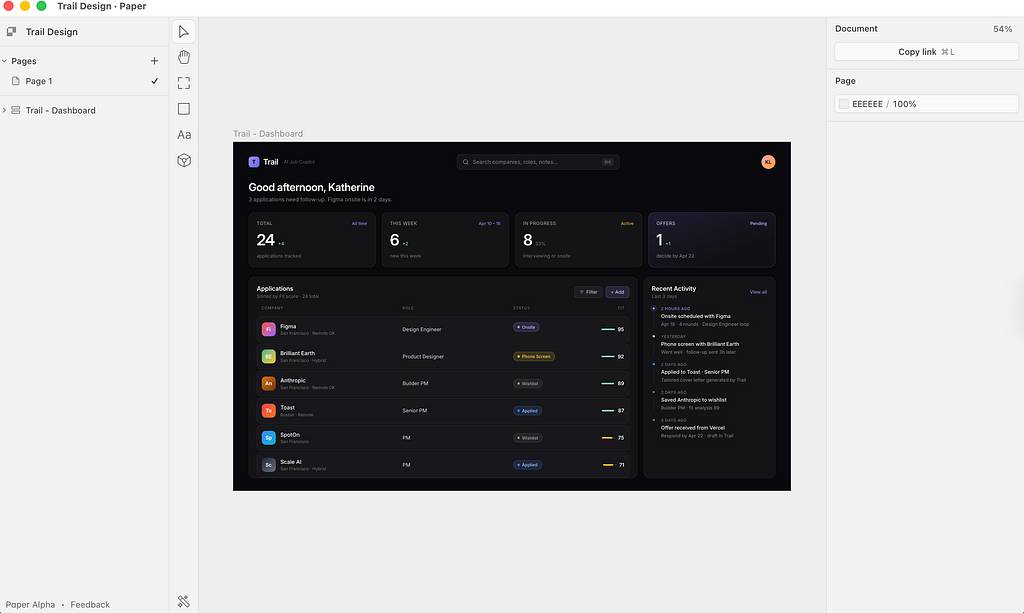
Trail Design in Paper
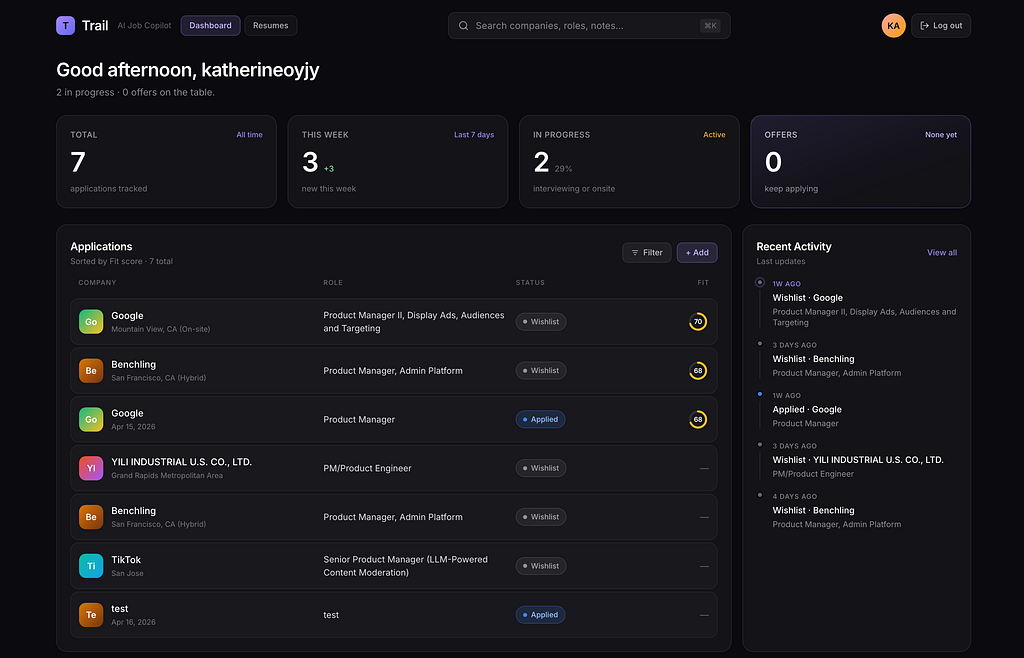
Trail Launched UI
What I Learned About Paper
Paper represents the design canvas as real HTML and CSS under the hood — not a proprietary format. This means when an AI agent reads your design, it’s reading actual code structure, not trying to interpret pixels. The fidelity of design-to-code translation is noticeably higher than screenshot-based approaches.
That said, Paper is in alpha. The MCP connection dropped twice during my session, and some complex gradient effects didn’t export cleanly. But the core workflow — describe → see on canvas → export to code — works, and it’s a genuine leap from the Figma → screenshot → prompt → code pipeline.
Day 2: Authentication, Data, and AI Intelligence
Building the Auth Layer
Trail is a private beta — only people I explicitly whitelist can sign up. I implemented this with a simple allowed_emails table in Supabase and a trigger that checks incoming registrations against the whitelist.
For login, I used Supabase’s magic link authentication. No passwords to manage, no OAuth complexity. Users enter their email, click a link, and they’re in.
The entire auth system — login page, middleware, session management, protected routes — was generated by Windsurf’s Cascade agent from a single prompt. I described the flow, referenced the Supabase docs, and the agent created six files across the project. First attempt had a missing import; I told the agent about the error, it fixed it, and the auth was working.
The AI Analysis Pipeline
This is the core of Trail’s value proposition. When you paste a JD (or when the Chrome Extension grabs one from LinkedIn), the analysis happens in two stages:
Stage 1: Extraction (MiniMax M2.5 — cheap and fast)
The JD text goes to a lightweight model that extracts structured data: company name, role, location, requirements, responsibilities. This model costs $0.12 per million input tokens — essentially free.
Stage 2: Fit Analysis (Claude Sonnet — deep and accurate)
The extracted JD data plus the user’s resume goes to Claude Sonnet for a nuanced comparison. It returns a fit score (0–100), top strengths, critical gaps, resume improvement suggestions, and interview talking points.
This two-stage approach is a product decision, not just a cost optimization. Fast extraction means the UI feels responsive (the company name and role appear almost instantly), while the deeper analysis can take a few more seconds without frustrating the user.
The prompt engineering mattered. My first version returned generic advice like “strong communication skills.” After three iterations of prompt refinement, the analysis started returning specific, actionable insights tied to actual bullet points in my resume and requirements in the JD.
Day 3: The Chrome Extension
This is where Trail goes from “a nice web app” to “something I actually use every day.”
Detecting Job Postings
The extension uses Manifest V3 with content scripts injected into LinkedIn, Greenhouse, Lever, Ashby, and other common ATS domains. When you navigate to a job posting, the extension badge lights up, and the pop-up shows “JD Detected.”
The tricky part was extracting the right text from LinkedIn. My first attempt grabbed document.body.innerText, which included my own profile information from the sidebar. The AI analyzed my profile instead of the JD — it told me I was a great fit for my own current job.
The fix was surgical: target LinkedIn’s specific DOM selectors for job descriptions (jobs-description__content, job-details), with fallbacks for other platforms and a generic <main> or <article> fallback for unknown sites.
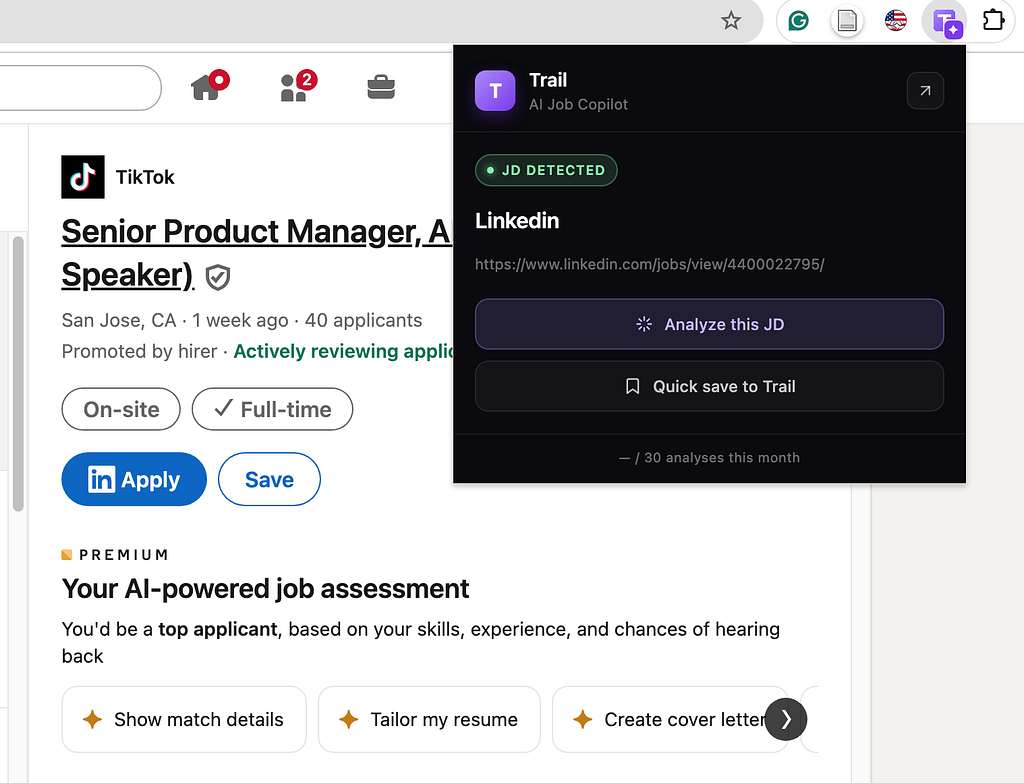
Trail Chrome extension
The Save Flow
Rather than implementing authentication inside the extension (which would mean managing tokens, refresh flows, and secure storage in a browser extension), I took a simpler approach: the “Save to Trail” button opens the web app with URL parameters containing the analysis results. The web app detects these parameters and pre-fills the add-application modal.
This is a deliberate product choice. The extension is a capture tool — lightweight, fast, minimal UI. The web app is where you manage, review, and reflect. Different tools for different modes of interaction.
Analysis Result
Day 4: Deployment and Polish
Resume Management
I added a /resumes page where I can store multiple resume versions (PM Resume, Design Engineer Resume, Product Engineer Resume). One is marked as default. When the AI analyzes a JD — either from the web app or the Chrome Extension — it automatically pulls my default resume for comparison.
This was the biggest improvement to analysis quality. Without a resume, the AI can only evaluate the JD in isolation. With a resume, it can identify specific matches (“Your Shopify API integration experience directly maps to their requirement for e-commerce platform knowledge”) and specific gaps (“They want 5+ years of people management; your experience is primarily IC”).
Deploying to Vercel
Deployment was straightforward — connect the GitHub repo to Vercel, add environment variables, push. One gotcha: the OpenAI SDK (used for OpenRouter’s API) tried to read the API key at build time, causing the build to fail. The fix was lazy initialization — creating the client on first use rather than at module load.
The app is now live. I use it every day in my actual job search.
Architecture Decisions Worth Highlighting
Why OpenRouter Instead of Direct API Calls
Three reasons:
- Cost optimization through model routing. I use a $0.12/M model for extraction and a $3/M model for analysis. Same quality, 50% cheaper.
- No vendor lock-in. If Anthropic has an outage, I can switch to Google’s Gemini or another provider by changing one string. My code doesn’t need to change.
- BYOK for future users. When I eventually open this up, power users can bring their own OpenRouter key. They pay for their own tokens, I pay nothing. This is the most sustainable pricing model for an indie AI product.
Why Supabase Over a Simpler Solution
I considered just using localStorage — It's a personal tool, after all. But I chose Supabase because:
- Row Level Security means that when I add friends to the beta, their data is automatically isolated
- Magic link auth means no password management
- The allowed_emails whitelist gives me precise control over who can sign up
- Usage logging lets me track API costs per user
Why a Chrome Extension Instead of a Bookmarklet
A bookmarklet would have been simpler, but extensions can:
- Run content scripts automatically (no click needed to detect a JD page)
- Show a persistent pop-up with analysis results
- Monitor for “application submitted” signals to auto-track
The effort difference is maybe 2 days vs half a day, but the UX improvement is substantial.
What I’d Do Differently
Start with the Chrome Extension, not the dashboard. The extension is where the magic happens — the moment you see “JD Detected” on a LinkedIn page you’re already browsing, the product clicks. The dashboard is important but secondary. I’d build the extension first, use a simple list view as the dashboard, and invest in the AI analysis quality.
Invest more in prompt engineering upfront. The difference between generic AI output and genuinely useful analysis is 3–5 iterations of prompt refinement. I spent too long on UI polish early on and not enough on making the AI output actionable.
Use Paper for more than one screen. I only designed the dashboard in Paper, then let the AI generate the rest (login page, resume management, modals) from text descriptions. The AI-generated screens are fine, but less cohesive than the Paper-designed dashboard. Next time, I’d design 3–4 key screens in Paper to establish a stronger design system.
The Meta-Lesson: AI-Native Product Development
Building Trail taught me something about what “AI-native” product development actually means in practice. It’s not about using AI to do your job faster — it’s about restructuring the job itself.
The traditional workflow: design in Figma → write a spec → hand off to engineering → review → iterate. Each handoff is a translation step, and every translation loses fidelity.
The workflow I used: describe what I want → AI agent creates the design → same agent reads the design and generates code → I review the running product → describe what to change → agent updates both design and code.
There are no handoffs. The “spec” is a natural language description. The “design review” happens in the browser, not in a Figma comment thread. The iteration cycle is minutes, not days.
This doesn’t make designers or engineers obsolete — it makes the boundaries between those roles obsolete. The skills that matter are judgment (is this the right thing to build?), taste (does this feel good to use?), and systems thinking (how do these pieces fit together?). The mechanical act of translating ideas into pixels or code is increasingly handled by AI agents.
Trail is a small product — a personal tool that maybe 10 people will ever use. But the workflow I used to build it is the future of how teams ship products. I’m certain of that.
Try It / Build Your Own
- Trail is deployed at trailai-rose.vercel.app (private beta, invite only)
- The Chrome Extension is available as an unlisted extension (DM me for the link)
- Paper is in open alpha at paper.design
- Windsurf is free to download at windsurf.com
- OpenRouter is at openrouter.ai
If you’re job hunting and want to build something similar, the entire stack is free or nearly free to start with. Supabase and Vercel have generous free tiers, OpenRouter charges per token with no minimum, and Paper gives you 100 MCP calls per week for free.
The best product I’ve ever built is the one I built for myself. Maybe yours is too.
Jinyao Ouyang is a Product Manager and Design Engineer. She writes about AI-assisted design and development workflows on Medium and builds things at jinyaodesign.com.
I Built an AI Job Copilot in 4 Days Using Paper, Windsurf, and OpenRouter was originally published in Bootcamp on Medium, where people are continuing the conversation by highlighting and responding to this story.