I Tried to Build an AI Figma Plugin. It Failed. So I Built a System Instead.
Originally published on Medium: https://medium.com/design-bootcamp/i-tried-to-build-an-ai-figma-plugin-it-failed-so-i-built-a-system-instead-27d1e83de985?source=rss-6c5be1f9757d------2
How I went from a clever tool that hallucinated swords on beaches to a repeatable pipeline that ships 36 Amazon listing images in hours.
Six months ago, I wrote a post about building an AI Figma plugin with Cursor. The idea was simple and, I thought, kind of brilliant: I run a DTC brand, I spend hours making Amazon listing images, so why not teach a plugin to do it for me? Feed it a product photo, let it detect what the product is, and have it generate all six listing images — main, lifestyle, infographic — straight onto the canvas.

Listing showcase
The workflow technically worked. The results did not.
The plugin would place a katana on a beach. It floated a sword in the sky. It recognized the object just fine, but it had no idea what the image was for. I ended that post with a tidy reflection — “AI can recognize objects, but not design intent” — and a list of next steps: add a style reference, improve product detection, build a feedback loop. If you’re interested in this case study, you can check my Medium article: Building an AI Figma Plugin with Cursor: Teaching Tools to Think Like Designers
I never did any of those things. And I want to be honest about why, because the reason taught me more than the plugin ever did.
The plugin solved the wrong problem
When I sat with the failure for a while, I realized the issue wasn’t the model or the detection accuracy. I had been treating generation as the hard part. Build a smarter generator, the thinking went, and good listings fall out the other end.
But generation was never my bottleneck. My bottleneck was that I had no system. Every SKU was a fresh negotiation with a blank canvas. There was no defined job for each image, no shared source of truth, no way to tell whether output #4 for one paddle matched output #4 for the next. A plugin that generated images faster just let me produce inconsistency faster.
The plugin was a tool looking for a process. What I actually needed was the process.
What I built instead: a 6-slot pipeline
So I stopped trying to automate the canvas and started defining the work. The result is the FLEXI-CASA Listing Image Pipeline — not a clever plugin, but a boring, repeatable system. Boring is the point.
The core of it is a fixed six-slot schema. Every product listing gets exactly these six images, and each slot has one defined job:
- White-background hero — the full product set, Amazon-compliant
- Dimensions — annotated measurements
- Fiberglass surface — material close-up with callouts
- Comfort grip — material and feel descriptors
- Pro credibility — brand and tournament positioning
- Lifestyle — user scenarios, on-court context

Listing templated generated by agent w/ slightly manually editing
This is the single most important decision in the whole project, and it has nothing to do with AI. Because each slot has a job, the output becomes auditable. I can look at slot 3 across every SKU and ask one question: Does this do the job of slot 3? Free-form generation can’t be audited. A schema can.
Three decisions that actually mattered
Gemini multimodal over text-only models. This is the lesson from the plugin, paid forward. Text-prompt-only generation hallucinates the product — that’s where the beach katana came from. The only path to fidelity is passing the actual product image in as input. The model should be editing reality, not inventing it.
Figma over Paper MCP for the design layer. I tested Paper MCP because it iterates faster, and for a while, I thought it would win. But at production scale, Figma’s component control and export reliability mattered more than iteration speed. I switched back.
A fixed slot schema, not free-form generation. Said it above, saying it again. The constraint is the product.
What shipped
- 36 images — 6 SKUs × 6 slots, PP-A14 through PP-A19
- Per-SKU production time went from days to hours
- A single Figma file holding slot wireframe templates, lifestyle references, and a batch output page
It does need manual editing for some details still, but in general, I will score this automation 7 out of 10 this time.
It runs in parallel with the FLEXI-CASA headless storefront — same brand, different surface.
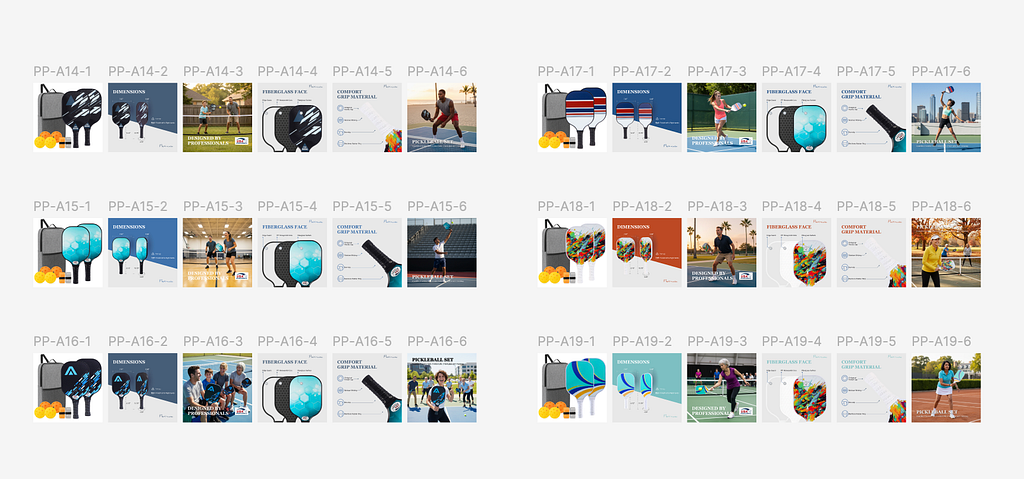
Generated listing w/ manual editing

Amazon listing
What’s still broken (and I’m leaving this in on purpose)
The pipeline is live. It is not finished. Two problems are still open:
Output quality is inconsistent across SKUs. My hypothesis: the per-slot prompt constraints aren’t tight enough, and lighting variance in the source photos is bleeding through into the generated images.
Slot copy drifts within a single listing. Right now, each of the six slots is generated independently, so the language can wander across one product’s images. The fix lives in the design, not the model: generate a structured per-SKU product brief first, then feed all six slots from that one source of truth. One brief in, six consistent slots out.
I’m shipping the case study with these flagged because a system you can diagnose is more valuable than one you pretend is perfect. Identifying the root cause is the work.
The takeaway
The plugin and the pipeline are the same person, six months apart, learning the same lesson from two directions.
AI handles structure and volume. Humans own consistency and judgment. The plugin failed because I asked AI to own the judgment — to know that a paddle doesn’t belong on a beach. The pipeline works because I kept that judgment for myself and gave AI the one thing it’s actually good at: filling a well-defined slot, at scale.
The next problem isn’t building a smarter generator. It’s making QA a spot-check instead of a rewrite.
AI won’t replace designers. But the designers who learn to build the system around the AI — not just prompt it — are the ones who’ll shape what these tools become.
I’m a Product Manager and Design Engineer building AI-native products end to end. Happy to walk through the Figma structure, the Gemini prompt patterns, or the QA workflow in detail — find me at jinyaodesign.com or on Medium.
I Tried to Build an AI Figma Plugin. It Failed. So I Built a System Instead. was originally published in Bootcamp on Medium, where people are continuing the conversation by highlighting and responding to this story.