TIAN HE YI PIN
Designing a Gesture-Controlled Immersive Showroom
An interactive exhibition experience combining gesture recognition, multi-screen interfaces, digital storytelling, and physical installations.

gestures designed
Three-screen UX/UI
Direct client collaboration
On-site testing & delivery
Project Overview
A delivered showroom experience · Primary interaction designer within a multidisciplinary team
TIAN HE YI PIN helped visitors explore a property development through its location, architecture, surrounding amenities, and future living environment. The showroom brought together large-format displays, animated 3D content, gesture input, and physical architectural models.
I designed the four Leap Motion gestures, interaction flows, and three-screen UX/UI. I communicated directly with the client, incorporated my manager’s design reviews, handed specifications to software engineers, and participated in on-site testing and delivery. The team implemented the software and physical installation.
Watch the on-site demonstration ↓
The Challenge
How could visitors explore complex property information without learning a complicated interface?
Location maps, transport links, architecture, and lifestyle content needed a clear structure. In a physical showroom, the interface also had to make sense to someone standing in front of an unfamiliar input device.
The challenge extended beyond screen layouts: visitors needed to know where to stand, which movement to make, and whether the system had responded. Large displays and physical screen seams added constraints that a desktop mockup could conceal.
Experience Strategy
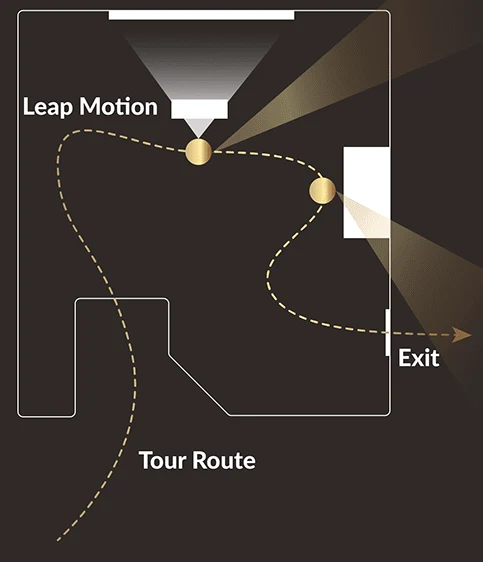
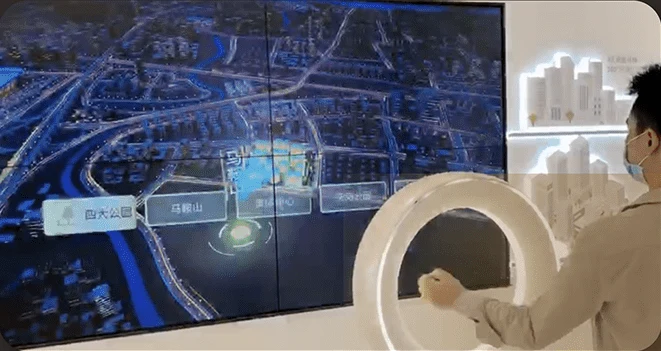
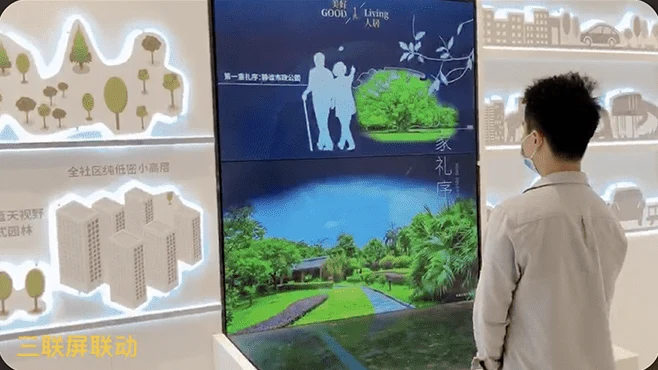
I organized the experience around exploration at two distinct installations. The gesture station supported browsing a digital property and location visualization. A separate physical-model installation used buttons to select animated content across three screens.
Installation 01
Gesture-controlled display
- Stand at the Leap Motion station
- Use on-screen gesture cues
- Open menus and switch topics
- Explore location and property content
Installation 02
Physical model + three screens
- Approach the architectural model
- Choose content with physical buttons
- Watch the related animated presentation
This gave each interaction a specific purpose: gestures for exploring information; physical controls for triggering a presentation around a tangible model. The design connected content to the visitor’s position and next action within the showroom.
Gesture Interaction Design
Four gestures, a clear vocabulary
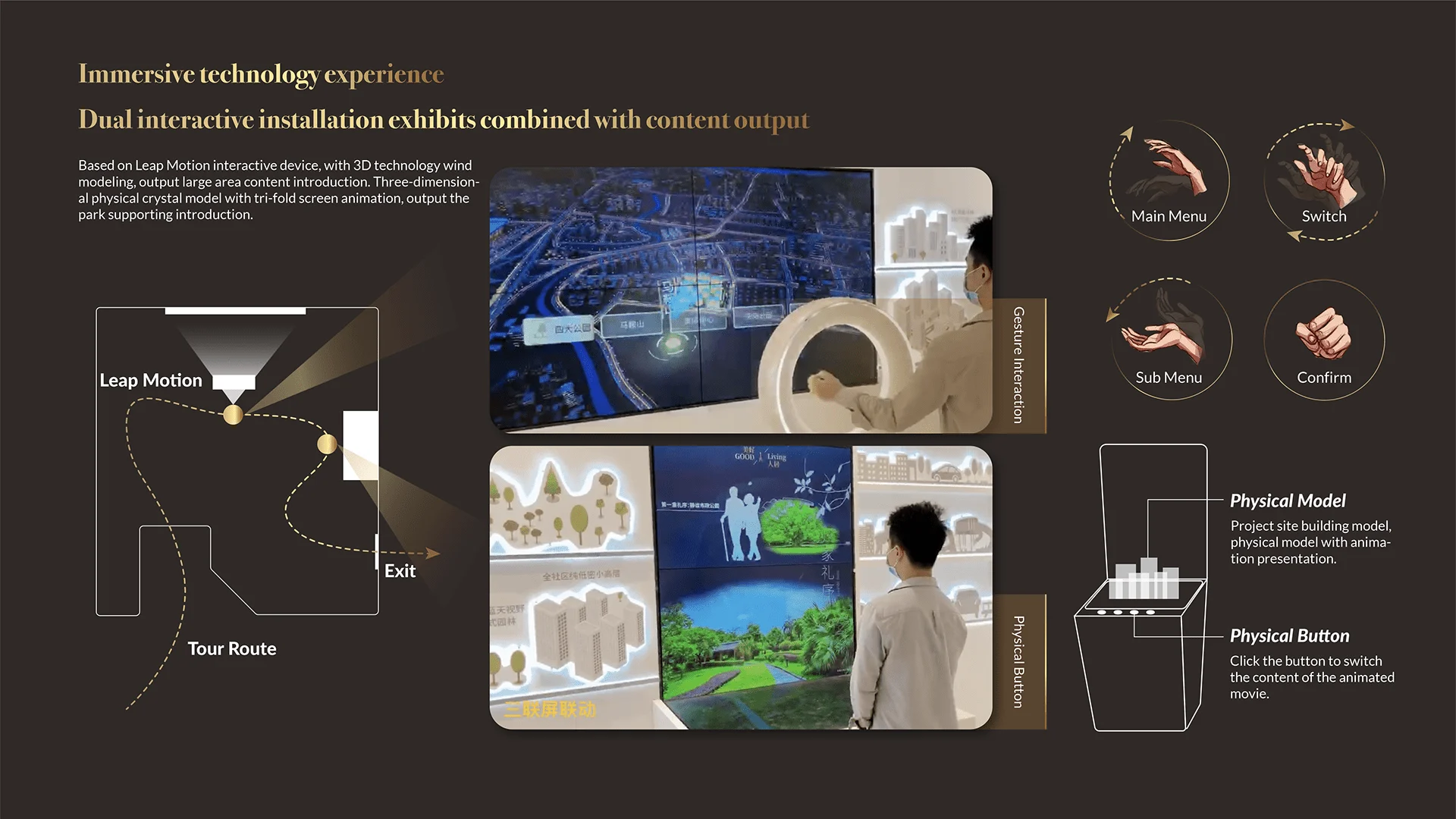
I designed a deliberately small gesture set: Main Menu, Switch, Sub Menu, and Confirm. Together, they provided the actions needed to access navigation, move between content, and make a selection.
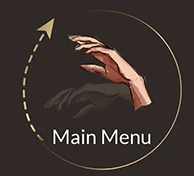
Main Menu
Move the palm upward to bring up the main navigation.
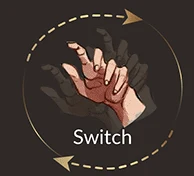
Switch
Move the hand left or right to switch the view.
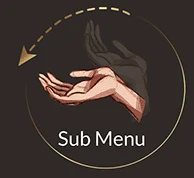
Sub Menu
Move the palm downward to access the next level of content.

Confirm
Close the hand to confirm the current selection.
Teach the interaction where it happens
Decision: show operating cues directly over the visualization. Hand illustrations, arrows, and short instructions explained the direction of movement for opening menus and switching views.
Why: a new input device cannot rely on the conventions of a familiar touchscreen. The prompts made the available actions visible without requiring visitors to memorize a separate instruction sheet.
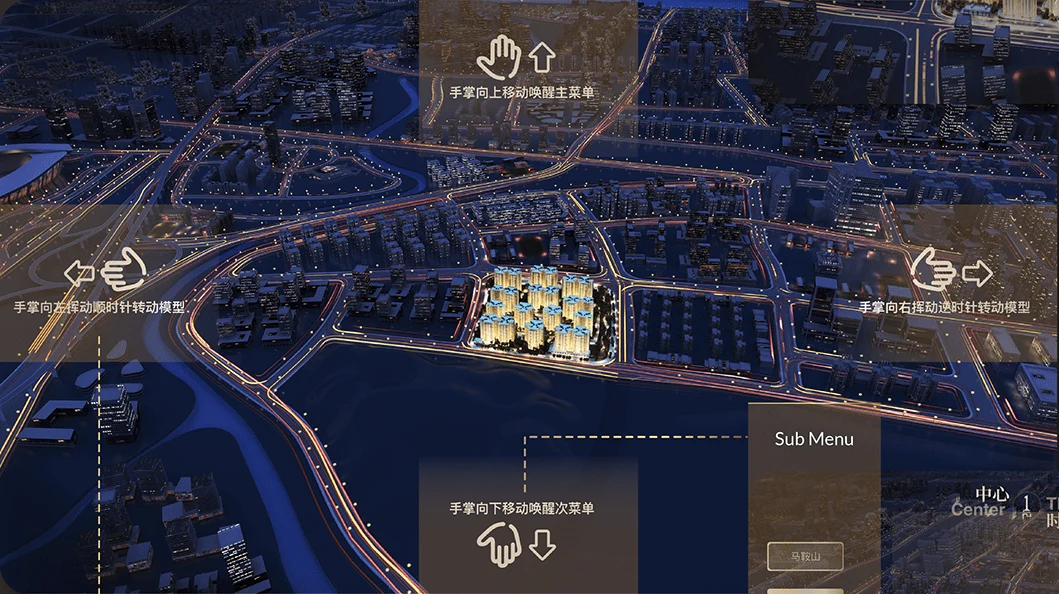
The flow moved from accessing a menu to switching topics, opening a submenu, and confirming a choice. I defined those interaction flows and their visual guidance; software engineers implemented recognition and application behavior.
Multi-Screen Interface Design
Give complex content a hierarchy
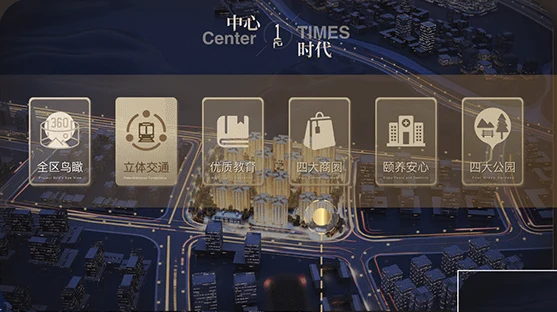
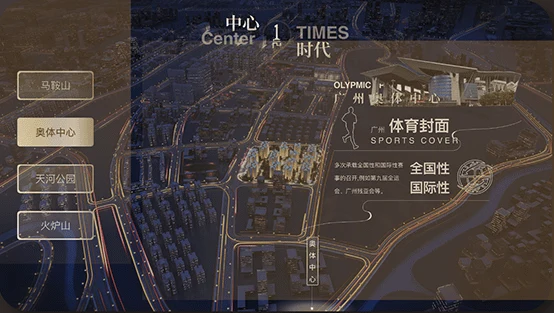
The interface separated main topics from more specific content. Main navigation surfaced categories such as transport, education, commercial areas, healthcare, and parks; submenus let visitors explore related destinations without placing every option on screen at once.
Design for the actual display surface
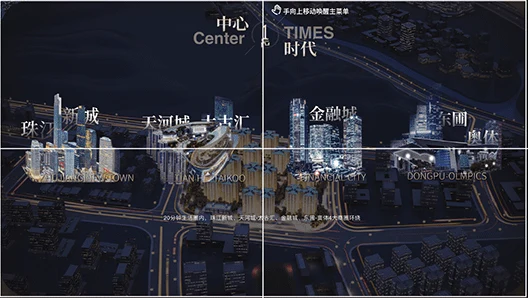
Decision: account for the physical boundaries between display panels, keeping important text and focal content clear of seams. The original large-display documentation includes a 2 × 2 panel layout; the physical-model exhibit uses a separate three-screen arrangement.
Why: a seamless design canvas can hide a very real interruption in a showroom. I treated screen boundaries as layout constraints and considered the visitor’s viewing position when arranging guidance and content.
Hardware + Software Integration
Gesture station
Leap Motion supplied hand input at a dedicated station in front of the large display. I designed the navigation, gesture vocabulary, prompts, and response states around that physical interaction. Engineers handled the input integration and software implementation.
Physical model and three-screen presentation
A separate exhibit paired architectural models with a three-screen animated presentation. Physical buttons switched the content. My three-screen UX/UI work accounted for the relationship between the controls, the physical model, and the digital story.
View the original hardware and interaction diagram →
From Design to Delivery
The work moved through client requirements, internal review, design refinement, engineering handoff, and on-site testing. I stayed involved as the experience moved from a proposal to a functioning installation.
Phase 01
Define & review
- Gather client requirements
- Design flows, gestures, and UI
- Review with my manager
- Refine with client feedback
Phase 02
Implement & deliver
- Hand off specifications to engineers
- Coordinate implementation details
- Test and debug on site as a team
- Iterate and support final delivery
My responsibilities: clarify client needs, design flows and UI, present iterations to my manager, incorporate feedback, communicate with clients, prepare specifications, and coordinate design details with engineers.
Shared implementation: software engineers built the interactive behavior; the wider team delivered the content, hardware, and installation. I participated in on-site testing and hardware–software debugging, helping refine the interaction and presentation before delivery.
Validation in context: the on-site review brought visitor positioning, gesture prompts, visual feedback, display boundaries, and content presentation into the same evaluation. Refinements were part of implementation and delivery rather than a separate visual polish phase.
Final Installation
The exhibition was implemented and deployed in a real showroom. The delivered environment included working gesture-controlled displays and physical-button-triggered multimedia exhibits.
The walkthrough documents the physical setting and functioning installation. The outcome demonstrated here is delivery; visitor engagement, satisfaction, and business impact were not measured in the available project materials.
Reflection
This project taught me to design the action around the screen as carefully as the screen itself. A gesture needed a discoverable cue; a navigation decision depended on where someone stood; a layout needed to survive the seams of a real display.
Working with clients, my manager, and engineers made iteration a practical discipline: preserve the experience’s intent while adapting it to input devices, content, and installation constraints. That connection between interaction design and real-world delivery continues to inform how I approach design engineering.