Trail
AI-Powered Job Hunt Copilot
days to ship
AI layers
Chrome Extension + Web App
Claude API integration
Overview
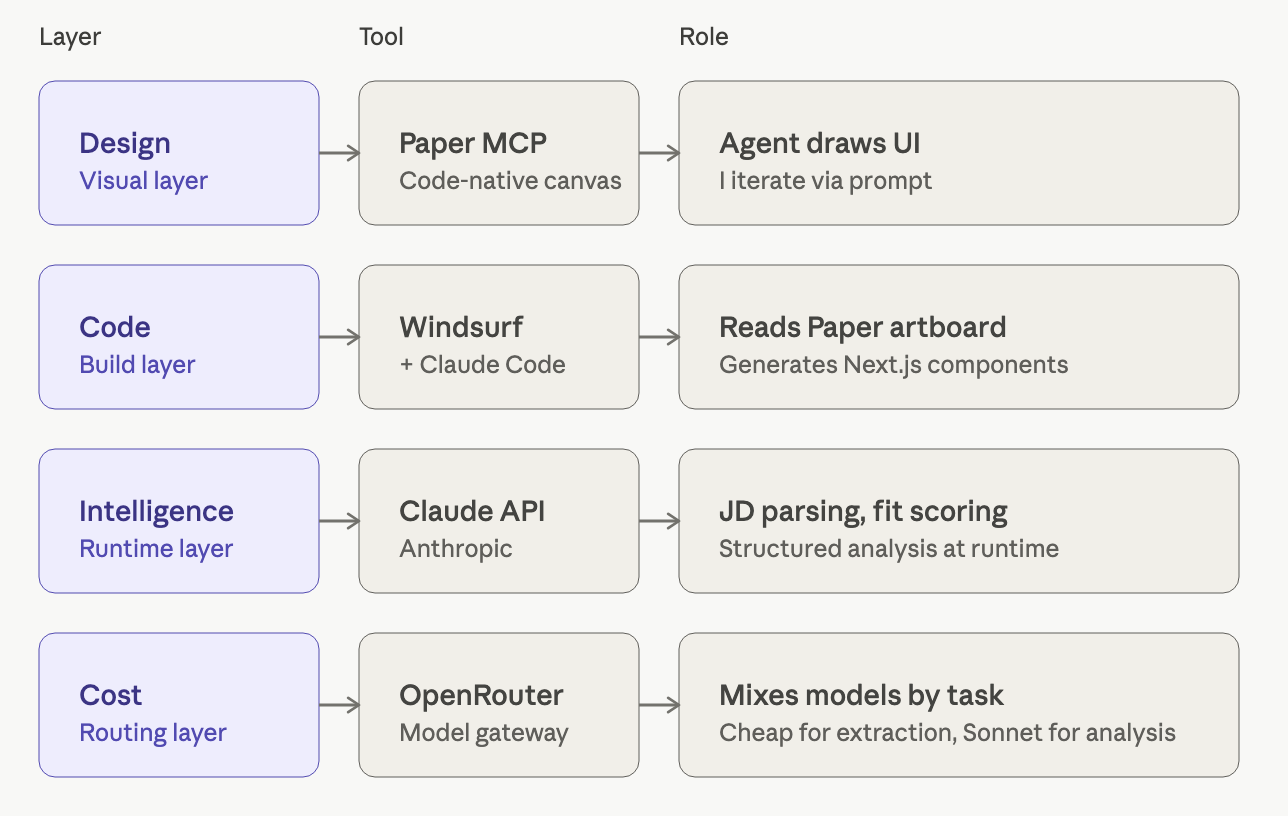
I was drowning in tabs during my job search — LinkedIn, Greenhouse, Lever, Ashby — copying company names into spreadsheets and re-reading JDs to remember why I cared. Existing trackers like Huntr and Teal solve recording, not thinking. So I built Trail: a Chrome extension that detects when I'm on a job posting, an AI pipeline that scores fit against my resume, and a glassmorphism dashboard I actually enjoy opening. Shipped in 4 days using Paper for design, Windsurf and Claude Code for engineering, and the Anthropic API for product intelligence — three AI layers, with me as director, not maker.
The Problem
Tracking ≠ helping. Existing tools (Huntr, Teal, Notion templates) are passive databases.
The real friction in a job search isn't recording applications — it's the cognitive load of evaluating each JD against your background, deciding whether it's worth applying, and remembering why you cared a week later.
Manual data entry compounds the problem: every saved role costs 60–90 seconds of copy-paste work.
The Insight
A tracker should be a copilot, not a database. The work happens while you're browsing JDs, not after. If the tool can analyze in-context and capture automatically, tracking disappears into the background.
The Solution
Three integrated layers work together to eliminate friction from job searching:
1. Chrome Extension (Capture Layer)
- Detects job postings on LinkedIn, Greenhouse, Lever, Ashby, Workday via Manifest V3 content scripts
- Generic JD extraction using
document.body.innerText— no site-specific selectors, letting the LLM handle parsing - Auto-detects application submissions via URL pattern matching (
/confirmation,/thank-you,/submitted) and confirmation copy in the DOM - Non-intrusive overlay: "✨ Detected you applied to [Company] — save to Trail?"
2. AI Analysis (Intelligence Layer)
/api/analyzeroute accepts JD text + resume ID, calls Claude API- Returns structured JSON: fit_score (0–100), strengths, gaps, resume_suggestions, talking_points, red_flags
- Streaming response for perceived speed
3. Dashboard (Review Layer)
Glassmorphism visual system:
- Dark
#0A0A0Fbase with mesh gradient (purple#6B5CFF→ cyan#00D4FF→ magenta#FF4D8F) bg-white/5+backdrop-blur-xlcards- 4 stat cards: Total · This Week · In Progress · Offers
- Application list with status pills, fit score rings, and recent activity sidebar
- Application detail page with re-analyze button and full AI breakdown
Design System
Colors: Dark base + glassmorphism + status pill palette (Wishlist gray, Applied blue, Phone Screen purple, Onsite teal, Offer green, Rejected red).
Fit Score Ring: SVG stroke-dasharray, no extra libraries. Color-coded: 80+ teal, 60–79 amber, <60 red.
Typography: Inter, semibold tracking-tight headers.
Components: Reusable glass card primitive, status pill, score ring, stat card.
Process — AI-Native Workflow
This project was built using three AI agents working in concert, with me directing:
Tradeoffs & Decisions
Generic content extraction over site-specific scrapers Lets the LLM do the parsing — one extraction path covers every job board, including ones I haven't seen. More resilient than brittle CSS selectors that break when sites redesign.
Web app first, extension second Built the AI analysis and dashboard before the extension so I had a working tool from day 1, even with manual JD paste. The extension became the convenience layer, not the foundation.
Glassmorphism over flat UI Job tracking is grim work; the visual treatment is part of the product — I built something I actually want to open. The dark glass aesthetic with mesh gradients makes an otherwise tedious task feel modern and intentional.
What I Shipped (in 4 Days)
- Live web app deployed on Vercel
- Chrome extension (Manifest V3) — detection + analysis + auto-capture
- Supabase schema for applications and resumes (multi-version support)
- AI analysis API endpoint with structured output
- Glassmorphism design system, reusable components
Reflection
What worked: AI-native workflow compressed weeks of work into days. Being my own user meant feedback loops were instant — I was fixing pain points I actually felt every morning.
What I'd do next: PDF resume parsing for multi-format support, Chrome Web Store listing for broader distribution, calendar integration for interview scheduling, weekly digest emails with insights.
What this project signals: I can move from problem → design → shipped product end-to-end, using AI not as a feature but as a native part of the building process. The tools change; the product thinking doesn't.
Live Demo & Code
The deployed application with full AI analysis, dashboard, and glassmorphism UI. Create an account to see the fit scoring in action.
Full source code including Next.js app, Chrome extension, Supabase schema, and Claude API integration. README includes setup instructions.